I want to access a USB-Stck plugged on the android panel (with mappVIEW-visualisation, side topic) from my PLC. The PLC shall export diagnosis- / statistic files like XML, CSV, PDF to the USB-Stick.
A - SItuation
IP 15: Android Panel with mappVIEW-Visualisation + USB-Port
IP 11: B&R PLC with data to be exported to USB-Stick which is plugged on Android-Panel
B - Several ideas, several fails B1: CIFS, port 445 = I couldn’t get access with FileIo and FUB DevLink: Error 20736 B2: FTP, port 21 = I couldn’t get access with FileIo and FUB DevLink: Error 20736
My guess:
CIFS access by B&R FileIo runs directly “static” from port 445. However, port 445 is not possible on the Android panel (…as far as I know), because otherwise I would have to root the panel. Which I can’t do, and don’t want to do (warranty, etc.).
Fact as well: I can not change the port to 4445 on FileIo DevLink FUB from B&R
B3: Subsequently (exclusion, cross-check, proof), I did the same with a Windows SMB client, where I can set the port:
Since I can access the USB stick here without any problems, I am now looking for a way to do the same with the B&R PLC (X20EM0611, X90). Any idea / experience?
A possible work around may be to run an FTP server on the Android-Panel. A quick web search shows there are a few apps that provide FTP via Android, so it seems feasible this could work.
Hi Adam,
As also for FTP (not only for SMB/cifs) B&R is using the standard-port 21 which can not be changed on PLC application levelt today this is not working without rooting the Android-Panel.
As SMB 445 and FTP 21 ports are “not CRA-conform” I guess B&R anyhow has to deliver a solution for libraries like FileIo and MpRecipe.
We will see…
My problem: I have to solve the access to the USB-Stick plugged on the android-panel today. That’s why I asked also the community for ideas / solutions.
as I remember, since AR 6.4 the FTPS server port is configurable in Automation Runtime, and starting with 6.5 the user / role system can be used with FTPS.
My status (update):
We are in contact with B&R support.
Since this type of application is very common but not easy to solve, because B&R specifies static ports (21/ftp 445/cifs by FileIo), which are currently blocked by the target system (e.g., Android) for security reasons.
Due to CRA (Cyber resilience act) comming with 01.01.2027 B&R must maybe change the strategy on this libraries anyhow.
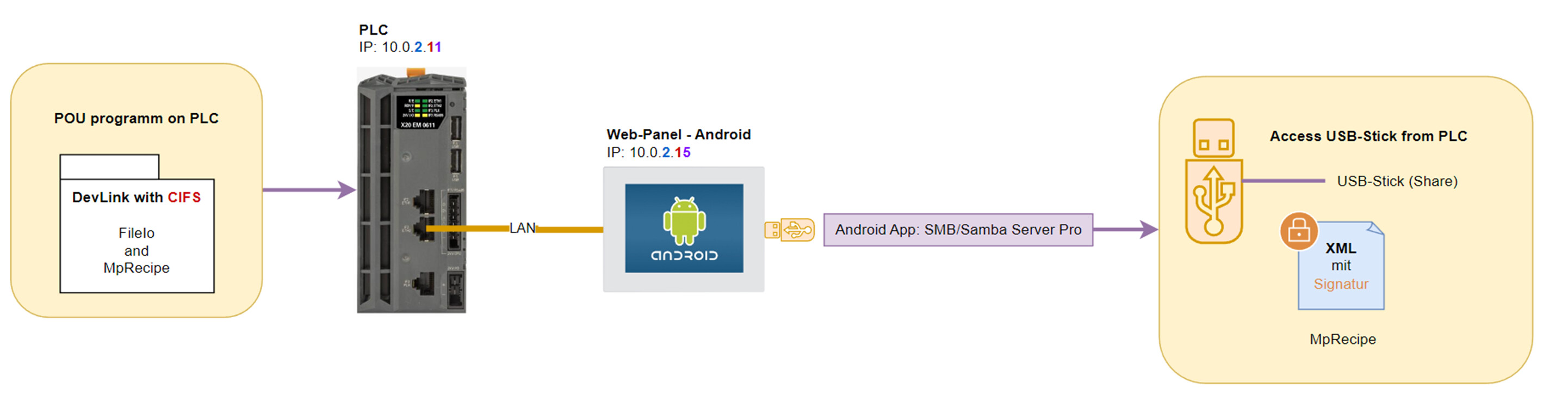
 B1: CIFS, port 445 = I couldn’t get access with FileIo and FUB DevLink: Error 20736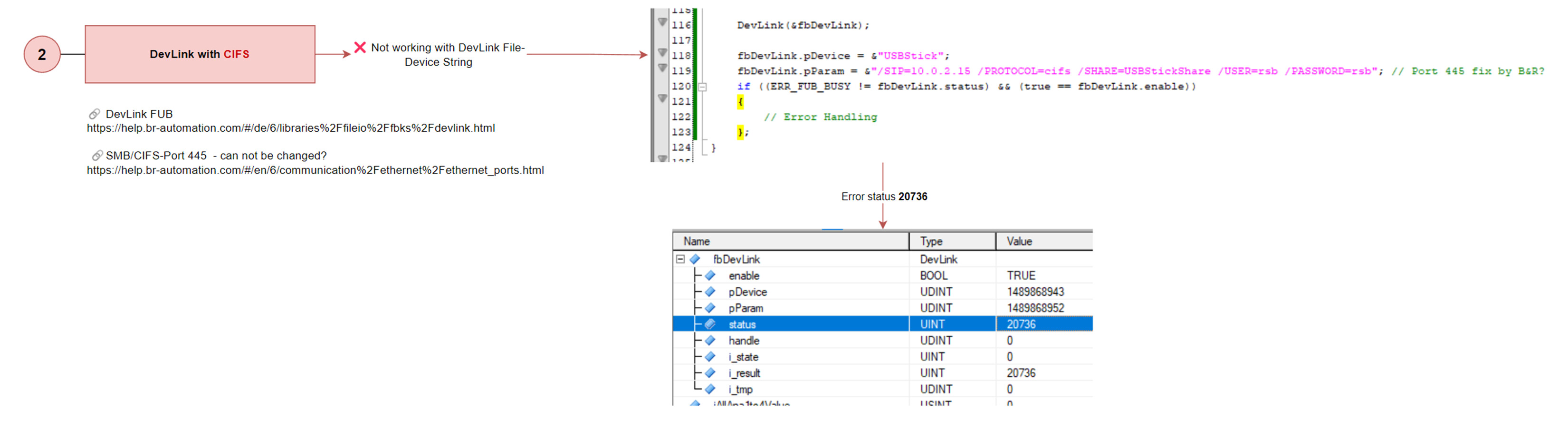
 DevLink FUB B&R Online Help
 My guess:
 B3: Subsequently (exclusion, cross-check, proof), I did the same with a Windows SMB client, where I can set the port: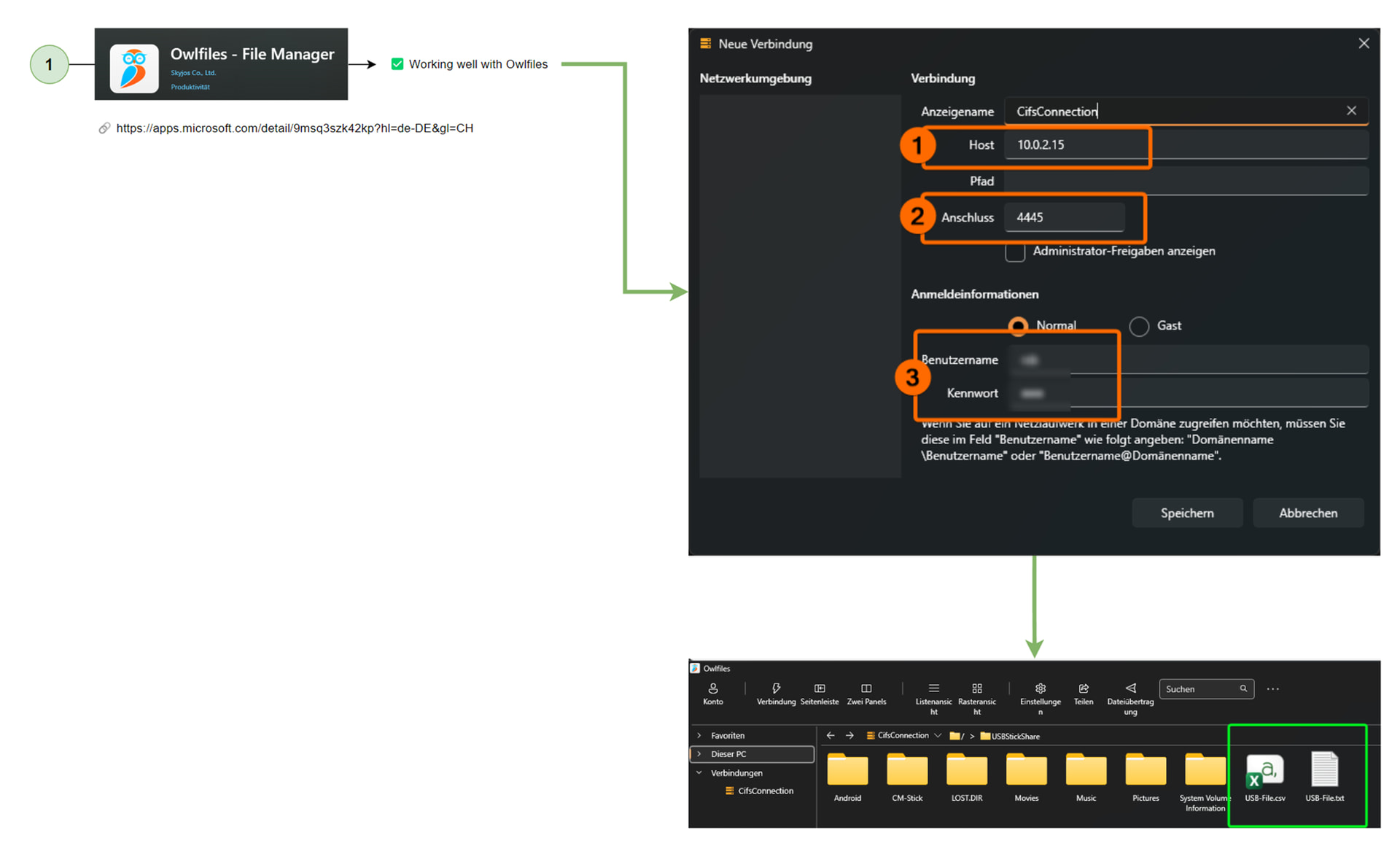
 MERRY CHRISTMAS to you all!