Hello,
I am looking for a solution that allows me to retrieve the project name and the activated machine configuration via code.
Firstly, I would like to know if this is possible, and if so, how?
I look forward to hearing from you.
Kind regards,
Hello,
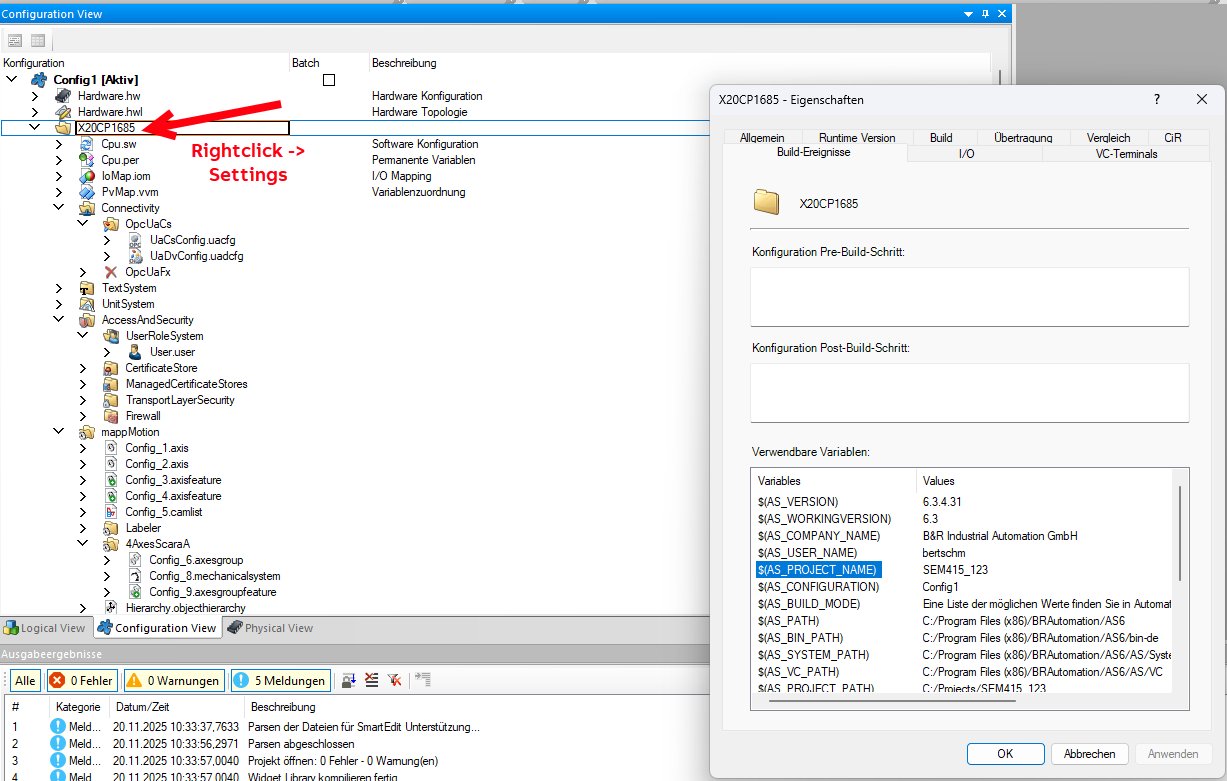
i do not know if there is a shorter way. But one solution could be to use a Prebuild Script, which writes the Information into a global-Variable File.
There are Variables with this Information usable for the Script call.
Each time you want to transfer the script will be called and update the Data.
Just one idea, lets look if there are some more.
Greetings
Michael
Hello,
another way could be to read out the ‘Configuration ID’ with ArProjectGetInfo
or to set a specific constant for each configuration in the ‘Build’ options:
If you use Git for version control, there is also the option of including the current software version in the runtime system:
br-na-pm/BuildVersion: Collect git version information during a project build
Hello
There is also a possibility to read the configuration ID and version
From:

// ================================================================== //
6: //IT5 === GET CONFIGURATION ID FROM THE INSTALLED PROJECT ON THE CPU === //
// ================================================================== //
fPrjGetCfId.Execute	:= TRUE;
fPrjGetCfId();

IF fPrjGetCfId.Done THEN
	gPrjNa 		:= fPrjGetCfId.ConfigurationID;
	gPrjVer		:= fPrjGetCfId.ConfigurationVersion;
	brsstrcat(ADR(gPrjVer), ADR('.'));
	brsstrcat(ADR(gPrjVer), ADR(gcPrjRea));
	InitStep 	:= 7;	//goto end initialization phase
ELSIF fPrjGetCfId.Error THEN
	gPrjNa 		:= 'unknown';
	gPrjVer		:= 'error';
END_IF;