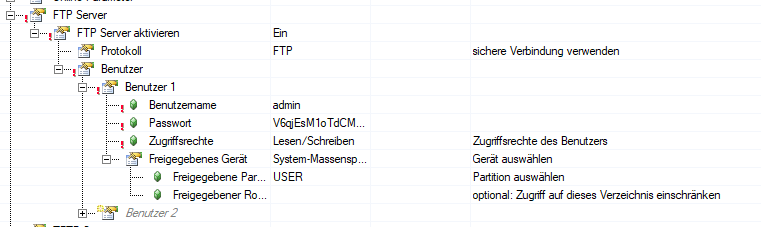
Check the “Module system on target” section of the CPU configuration. Is there a minimum user partition size greater than zero configured? I remember running into a similar issue a while back and that was the solution.
It also doesn’t hurt to try re-entering the password you want to use into the FTP configuration and rebuilding the project.
It says that it is now possible to change the FTP port, but I’m having trouble finding the setting that actually does this in AS.
Which AR version did you upgrade from? I’m wondering if it was a big leap or a small one. My first thought is to downgrade one version (i.e. to O4.93) and see if you can connect. If yes, then it’s specifically this version that’s causing issues.
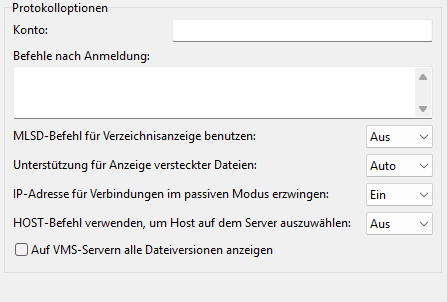
I don’t know why it would make a difference, but you could also try a different FTP program. I use FileZilla and the connection has always worked for me with default settings. I’ve never used WinSCP but there is a Help article which shows the needed WinSCP settings. These differ slightly from your screenshot, but if it’s worked before, I’m not sure if changing those would make a difference:
One other question, how is the connection physically set up? Are you connected directly to the PLC or are you connecting via a network or remotely? It’s also possible that the network infrastructure between you and the PLC (if there is any) is preventing the connection.
looks like a regression problem from O4.93 to P4.93. In O4.93 FTP works just fine (retested as we speak). In P4.93 it’s broken. And I can not find the port setting either.
Connection is direct through a switch but same network.
FileZilla works, but WinSCP does not. I have tested all combination of WinSCP setting, including the one which is described in the help file.
I got some clarification that the AS setting for changing the FTP port will not be available until AS version 4.12.9 which is not yet released. However, you can currently change the port using the new AsARCfg library function blocks (CfgSetFTPServerPort and CfgGetFTPServerPort).
I’m not sure what has changed that makes WinSCP no longer work. It sounds like you have two available workarounds:
Use AR O4.93, or
Use FileZilla
If you want to get more information about using WinSCP with AR P4.93, I recommend reaching out to your local B&R team to make a support ticket. Since P4.93 was released so recently, that’s probably the fastest way to get answers. However, if someone who knows the answer sees this hopefully they’ll post a reply.