Hi if you’re reading this I need assistance from ,
I’m trying to interface a Keyence MK-U6000inkjet printer with a B&R X20IF1082-2 over, communication protocol Ethernet TCP using structured text.
I’d like to send the SERVER (INKJET Printer) string data like ‘Hello, Printer!’ from the CLIENT(PLC) to print and executable commands like start/stop print.
Hardware setup so far:
PLC: X20IF1082-2
PLC IP: 192.168.1.100
Keyence Printer IP 192.168.10.22
Keyence Printer Port number: 9004
AsTCP:
I was able to add a AsTCP library from the B&R Libraries into the logical view from the object catalog. This consists of AsTCP functions,typ, and var.
Is there a way to get a AsTCP.ST ? I’d imagine there are guides/templates to connect to 3rd party devices for ethernet communication using structured text.
Are there any config settings I may be missing?
Is there a more efficient way to approach this in your humble experience?
Looking forward to your responses. Thank you for reading.
the’re samples included with the Automation Studio installation.
Just open your local Automation Help installation on your development PC, find the library help of AsTCP, and have a look into the section “examples”.
Additionally, you can have a look into a demo and a wrapper implementation on github:
From what you described, I assume that the printer is the TCP server (“waiting for commands/data”), so the PLC has to be the TCP client (“actively open a connection and send data”).
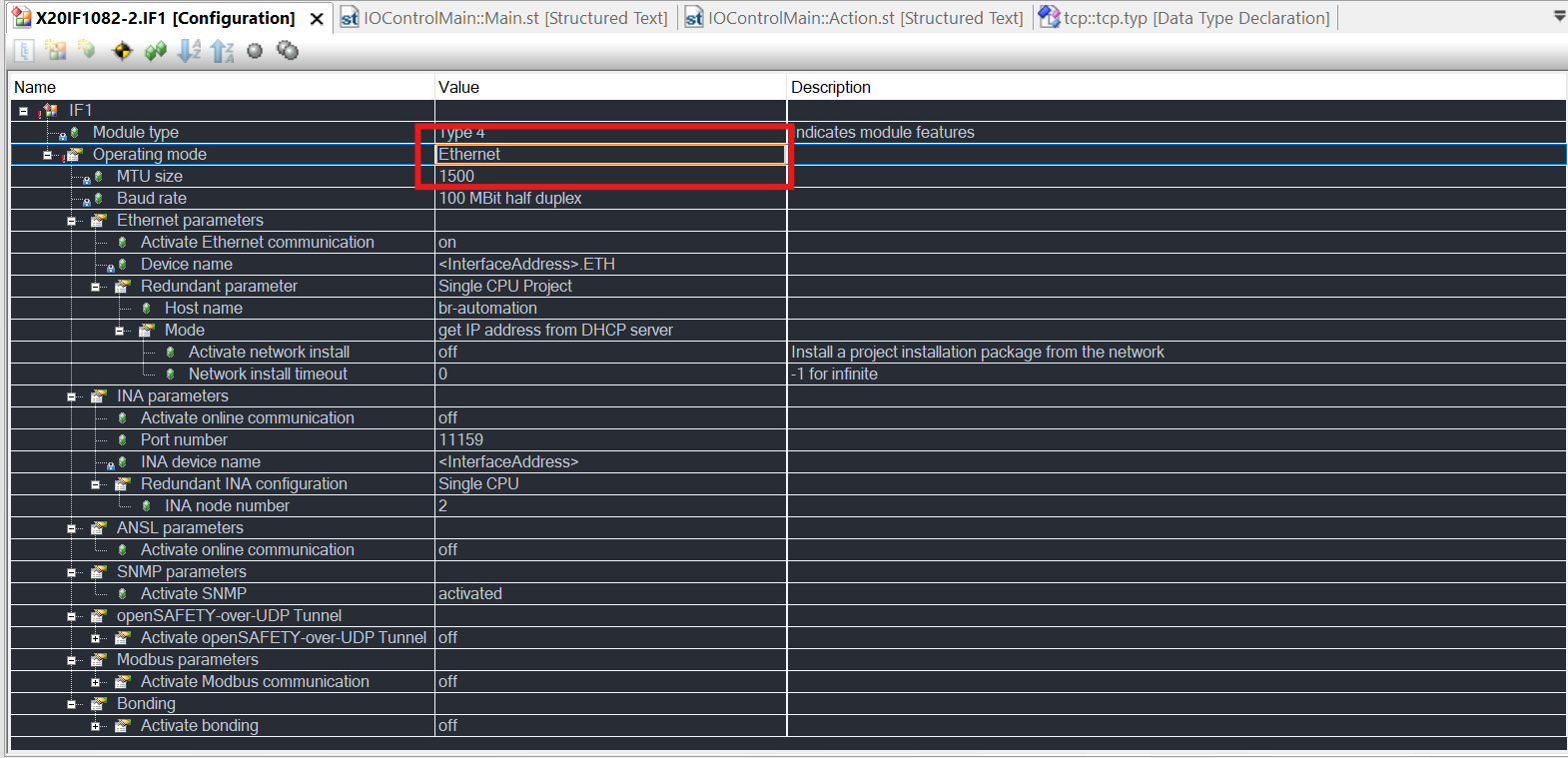
And the X20IF module has to be set to operating mode “ethernet”, as with default setting it works as a Powerlink managing node.
I downloaded automation studio 4.11 (I only work with 4.6) to open these project examples you linked to examine how they’re using AsTCP.
I remember locating a LibAsTCP1_ST that had a general server and client program in structured text much like a sample program but I cannot seem to allocate it to attach to my plc project.
Also, yes the printer (server) is waiting for commands from the PLC (client).
I looked up the help on AsTCP but it appears to reference LibAsTCP1_ST quite a bit even calling out specific lines so without it I’ve been attempting to write it from scratch referencing the first demo AsTcp-AsUdp link you attached. Currently my plc does not appear to be sending data to the printer yet.
Where can I locate LibAsTCP1_ST to properly attach it to my project?
// Source Code that worked for this application for other users to reference.
// Still raw room for more modification depending on applications.
PROGRAM _CYCLIC


	LibAsTCP1_ST.send_data[0] := LibAsTCP1_ST.send_data[0] + 1;  (* Generate a "running" variable for Data transfer *)

	CASE Client.sStep OF

		 0: (* Open Ethernet Interface *)
			Client.TcpOpen_0.enable := 1;
			Client.TcpOpen_0.pIfAddr := ADR('0');  (* Which Interface to open *)
			Client.TcpOpen_0.port := 0;  (* Port on client side to use *)
			Client.TcpOpen_0.options := 0;
			Client.TcpOpen_0;  (* Call the Function *)

			IF Client.TcpOpen_0.status = 0 THEN  (* TcpOpen successfull *)
				Client.sStep := 5;
			ELSIF Client.TcpOpen_0.status = ERR_FUB_BUSY THEN  (* TcpOpen not finished -> redo *)
			  (* Busy *)
			ELSE  (* Goto Error Step *)
	//				Client.sStep := 100;
			END_IF

		1:
			Client.TcpOpen_0;  (\* Call the Function *)

		5:
			Client.linger_opt.lLinger := 0; (* linger Time = 0 *)
			Client.linger_opt.lOnOff := 1; (* linger Option ON \*)

			Client.TcpIoctl_0.enable := 1;
			Client.TcpIoctl_0.ident := Client.TcpOpen_0.ident; (* Connection Ident from AsTP.TCP_Open *)
			Client.TcpIoctl_0.ioctl := tcpSO_LINGER_SET; (* Set Linger Options *)
			Client.TcpIoctl_0.pData := ADR(Client.linger_opt);
			Client.TcpIoctl_0.datalen := SIZEOF(Client.linger_opt);
			Client.TcpIoctl_0;

			IF Client.TcpIoctl_0.status = 0 THEN  (* TcpIoctl successfull *)
				Client.sStep := 10;
			ELSIF Client.TcpIoctl_0.status = ERR_FUB_BUSY THEN  (* TcpIoctl not finished -> redo *)
			  (* Busy *)
			ELSE  (* Goto Error Step *)
				Client.sStep := 100;
			END_IF


		10: (* Connect to the other Station *)
			Client.TcpClient_0.enable := 1;
			Client.TcpClient_0.ident := Client.TcpOpen_0.ident;  (* Connection Ident from AsTCP.TCP_Open *)
			Client.TcpClient_0.portserv := 0;  (* Port on server side to use *)
			Client.TcpClient_0.pServer := ADR('0');  (* Server Address *)
			Client.TcpClient_0;  (* Call the Function*)

			IF Client.TcpClient_0.status = 0 THEN  (* Open ok -> Send Data *)
				Client.sStep := 20;
			ELSIF Client.TcpClient_0.status = ERR_FUB_BUSY THEN  (* TcpClient not finished -> redo *)
			  (* Busy *)
			ELSIF Client.TcpClient_0.status = tcpERR_INVALID THEN  (* Port error -> Close actual connection, and reopen a new one *)
				Client.sStep := 40;
			ELSE  (* Goto Error Step *)
				Client.sStep := 100;
			END_IF

		20: (* Send Data to the Server *)
			Client.TcpSend_0.enable := 1;
			Client.TcpSend_0.ident := Client.TcpOpen_0.ident;  (* Connection Ident from AsTCP.TCP_Open *)
			Client.TcpSend_0.pData := ADR(CommandString);  (* Which data to send *)
			Client.TcpSend_0.datalen := SIZEOF(CommandString);  (* Lenght of data to send *)
			Client.TcpSend_0.flags := 0;
			Client.TcpSend_0;  (* Call the Function*)

			IF Client.TcpSend_0.status = 0 THEN  (* Data was sent sucessfully -> receive data *)
				Client.sStep := 30;
			ELSIF Client.TcpSend_0.status = ERR_FUB_BUSY THEN  (* TcpSend not finished -> redo *)
			  (* Busy *)
			ELSIF (Client.TcpSend_0.status = tcpERR_SENTLEN) OR (Client.TcpSend_0.status = tcpERR_NOT_CONNECTED) THEN (* Connection Lost *)
				Client.sStep := 40;
			ELSE  (* Goto Error Step *)
				Client.sStep := 100;
			END_IF

		30: (* Receive Data from the Server *)
			Client.TcpRecv_0.enable := 1;
			Client.TcpRecv_0.ident := Client.TcpOpen_0.ident;  (* Connection Ident from AsTCP.TCP_Open *)
			Client.TcpRecv_0.pData	:= ADR(LibAsTCP1_ST.receive_data);  (* Where to store the incoming data *)
			Client.TcpRecv_0.datamax := SIZEOF(LibAsTCP1_ST.receive_data);  (* Length of data buffer *)
			Client.TcpRecv_0.flags := 0;
			Client.TcpRecv_0;  (* Call the Function*)

			IF Client.TcpRecv_0.status = 0 THEN  (* Data was received sucessfully -> Send next packet *)
				Client.sStep := 20;
				Client.recv_timeout := 0;
			ELSIF Client.TcpRecv_0.status = tcpERR_NO_DATA THEN  (* No data received - wait *)
			  Client.recv_timeout := Client.recv_timeout + 1;
			  IF Client.recv_timeout > 50 THEN
				Client.sStep := 40;
				Client.recv_timeout := 0;
			  END_IF
			  (* No Data received *)
			ELSIF Client.TcpRecv_0.status = ERR_FUB_BUSY THEN  (* TcpRecv not finished -> redo *)
			  (* Busy *)
			ELSIF Client.TcpRecv_0.status = tcpERR_NOT_CONNECTED THEN (* Connection Lost *)
				Client.sStep := 40;
			ELSE  (* Goto Error Step *)
				Client.sStep := 100;
			END_IF

		40: (* Close connection *)
			Client.TcpClose_0.enable := 1;
			Client.TcpClose_0.ident := Client.TcpOpen_0.ident;  (* Connection Ident from AsTCP.TCP_Open *)
			Client.TcpClose_0.how := 0;
			Client.TcpClose_0;  (* Call the Function*)

			IF Client.TcpClose_0.status = 0 THEN  (* Close sucessfull -> Reopen the interface *)
				Client.sStep := 0;
			ELSIF Client.TcpClose_0.status = ERR_FUB_BUSY THEN  (* TcpClose not finished -> redo *)
			  (* Busy *)
			ELSE  (* Goto Error Step *)
				Client.sStep := 100;
			END_IF

	   100: (* Here some error Handling has to be implemented *)

	END_CASE

END_PROGRAM
could you please share what you actually changed? I don’t think it’s of much use to share the code that’s already provided via the samples and which people should insert from there
Thanks
Edit: Also of note is that these samples are only meant to be just that, samples. They are, in terms of code style and other features like missing error handling, to be midly phrased, rather lacking.
Thanks for your message. I understand what you mean — I mainly made some small adjustments to the sample code to suit our setup and the device’s communication requirements. The main idea was to adapt the sample to the Keyence command structure and make sure the connection parameters matched our network.
Since this is still under development and part of a larger proprietary project, I can’t share the full implementation details. But the general approach should be similar to what’s shown in the sample — just ensure the syntax and addressing match your own device’s documentation.
 ,
,