Hi all,
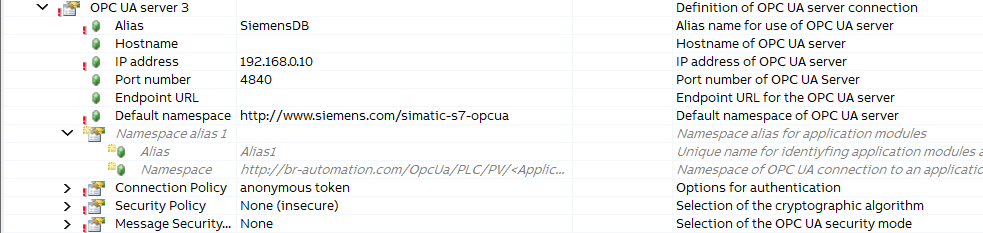
I’m trying to bind mappView widgets to an external OPC UA server. The external server has been added, and according to the log file, the connection is successfully established.
However, I’m unable to read any nodes from the server. The server’s NodeIds use identifier type: numeric, but it seems that mappView always tries to access them using identifier type: string.
Is there a way to configure mappView to use the numeric identifier type when connecting to an external OPC UA server?
Browsing the same node using uaexpert looks like this:
I’ve already tried several variations in the binding file, such as:
refId="ns=2,i=6067"refId="6067"refId="i=6067"refId="2,6067"
But none of them worked.
Is there a way to change the identifier type?
Any advice would be appreciated.
Thanks a lot,
Bernhard
Yes this is possible. See section Variables on a remote OPC UA server with namespace and identifier in the AS-Help(online)
That was the solution. I didn’t find it in the help at first. Thanks a lot.
Hello @Bernhard_Felber ,
I think you’re trying to connect to a Siemens OPC UA Server — I had the same issue before. Here’s what you need to do:
-
Set up the external OPC UA server in mapp View:
Make sure you use the correct Namespace Index for your variables. From your screenshot, it looks like you need to use the second Namespace Index.
-
Configure the binding file properly:
For example:
-
Use serverAlias="http://Serverinterfaces_1"
-
Set refId="NS2|Numeric|6067"
-
Link it to the right widget using widgetRefId="NumericOutput1"
I’m sharing this based on my working setup — hope it helps fix your issue!

Let me know if you’d like help checking your current configuration or binding file.