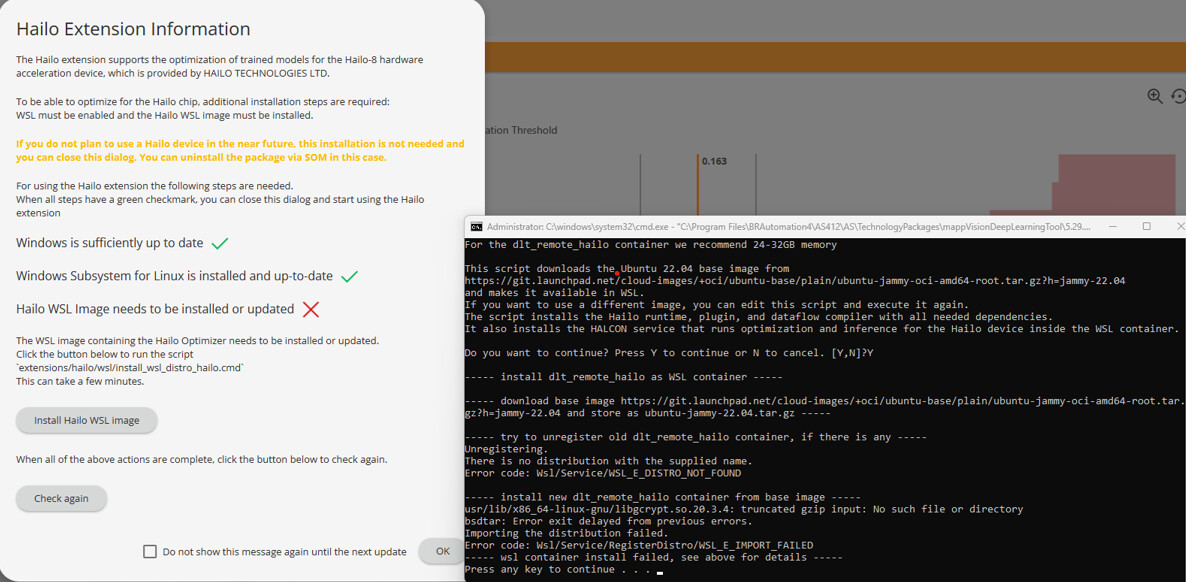
New to B&R and am trying to install DLT v5_29.0.2. When opening DLT from AS4 a pop-up shows “Hailo WSL Image needs to be installed or updated”. It then downloads ubuntu-jammy-22.04.tar.gz from git. It then fails. I presume this is required to use a VSC523 smart camera. I was trying on a virtual machine (sent down rabbit hole of VM settings) first but then gave up and tried on a normal pc. Both had the same issue. Any help would be much appreciated.
Thanks for the quick reply. I have followed that advice directly on laptop and on the VM I was trying to setup. I have probably tried about 6 times on each (closing the cmd.exe window and just pressing the Install Hailo WSL Image button) but I get the same fail each time.
The image, named “ubuntu-jammy-22.04.tar.gz” should be around 30 MB in size. If you see that yours is not that size, then the script’s download failed partway through. Find the URL to the image in the “install_wsl_distro_hailo2.cmd” file’s “IMAGE_SOURCE” variable and download it with an internet browser. You can then:
Copy the image from your Downloads into “extensions/hailo/wsl”
Rename the image to “ubuntu-jammy-22.04.tar.gz” so the script will recognize it
Edit “install_wsl_distro_hailo2.cmd” to remove the block that starts with “if exist %IMAGE_FILE%”, to ensure that your image is not deleted and redownloaded.
Run the “install_wsl_distro_hailo.cmd” script again so it can install the image and change the WSL settings to the recommendations for the DL Tool.
You will know you are successful when the script starts installing python packages.