We have Servo & induction motor combination printing application,
When Emergency pressed or power off Induction motor suddenly stop but Servo not.
want to stop servo immediately without any deceleration delay
please suggest
Thanks
Veeresh Suranagi
We have Servo & induction motor combination printing application,
When Emergency pressed or power off Induction motor suddenly stop but Servo not.
want to stop servo immediately without any deceleration delay
please suggest
Thanks
Veeresh Suranagi
Hi @veeresh.suranagi ,
few questions focus on servo drive:
Motor commutation stops immediately when STO is activated. Then the motor holding brake is engaged and it stops the motor movement.
It will wear out the motor holding brake.
The correct way to handle e-stop is to use the quickstop function to stop motion (well controlled), then activate STO with a delay
For example on the standard ACOPOS you see an input for quickstop
Ciao
Valerio
Dear Sir,
It’s not a brake motor.
Its combination of Induction motor & Servo Motor application.
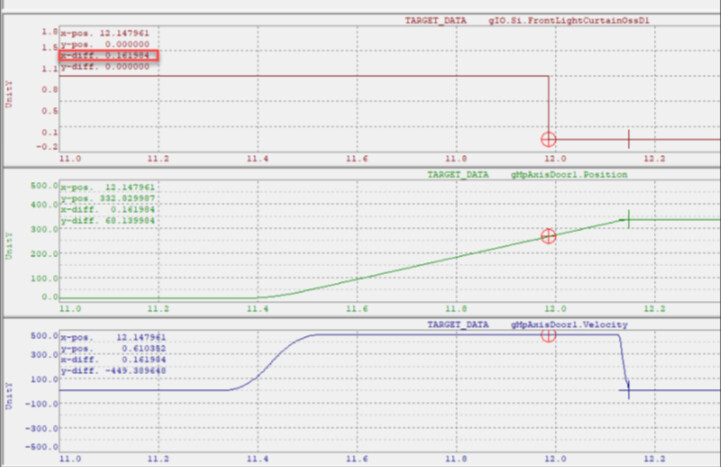
In Below graph you can observe:
1&2 --are Servo motor --takes deceleration time to stop when Emergency & power cut.
3&4th --Induction motor & stops immediately when emergency or power cut.
After some observation i did small changes in B&R AS software like below.
strAxes.strPMMotorA.JogVelocity.rDec := 0;
strAxes.strPMMotorA.JogVelocity.rVel := 0;
strAxes.strPMMotorA.strStatus.posInfo.rVelocity:=0;
strAxes.strPMMotorA.PowerOff();
 strAxes.strPMMotorB.JogVelocity.rDec := 0;
 strAxes.strPMMotorB.JogVelocity.rVel := 0;
 strAxes.strPMMotorB.strStatus.posInfo.rVelocity:=0;
 strAxes.strPMMotorB.PowerOff();
after that observed like in below graph find below
as per above 2 graph motor stops immediately.
Please suggest
pls see Valerio’s hint:
Motor commutation stops immediately when STO is activated
and
The correct way to handle e-stop is to use the quickstop function to stop motion (well controlled), then activate STO with a delay
and do not set your deceleration to ‘0’ since that is physically impossible.
Hi @valerio.manenti @christoph.hilchenbac
using 8EI034HWS10.xxxx-1 Servo drive.
In below which category we need to use.
Please suggest.
Unfortunately, we cannot tell you which safety category your machine must meet.
However, if regulations require that the machine be stopped as quickly as possible in the event of a safety emergency—without using a mechanical brake—then you should use the Quickstop.
This ensures that the emergency stop signal is routed immediately to the (non-safe) Quickstop input of the drive.
The (safe) STO (enable input), however, receives the signal with a delay.
The delay must not exceed the time it would theoretically take for the machine to come to a stop under maximum load.
After that, the safety relay must remove the enable signal.
The non-safe delay is then configured using the Quickstop parameters, and the safe timeout is configured via the safety relay.
But let me repeat: we can’t decide what counts as “safe” for your machine. That requires a safety assessment.
If you need any further information about configuring Quickstop, please let us know whether you’re using Mapp Motion or Acp10
using Acp10
This Quickstop need to use right?

In Drive Pin configuration not found Quickstop pin, found only Enable1, enable2 pins.
Hi @veeresh.suranagi ,
check this post QuickStop function issue in B&R ACOPOS – error despite correct trigger1 signal .
Ciao
Valerio
Hi,
This Quickstop need to use right?
depends on. Using ‘ncA_LIMIT’ is the simplest method, and therefore the best approach for now.
In this case the drive is slowed down by the deceleration given by the values ‘limits.a2_neg’ abd ‘limits.a2_pos’.
see Limit Values
In Drive Pin configuration not found Quickstop pin, found only Enable1, enable2 pins.
see connector Connector X8 - Pinout. Usually we select ‘Trigger2’ as Quickstop - Input.
for the configuration see Digital Inputs
Hi Sir,
Thanks for ur support.
I will check in shop floor machines & let u know.
Hi Sir,
Thanks for your support.
I am implementing the Quick stop function in servo.
I need details steps or any document for doing Quick stop in logic.
Then we will check simulation & then implement in machine.
Regards
Veeresh Suranagi
Hi @veeresh.suranagi ,
Christoph has already provided all links in AS Help.
Maybe I can describe step by step what you have to do in case you are using mapp legacy (ACP10) and ACOPOS P3:
In this example for the axis configuration I select the option ‘Init Parameter Table’
Open your mapping table and check which init table you have selected for your axis
For example on trigger 2 configure your quickstop, you have few options:
That’s all. You will see no logic in the task, only settings in the configuration view. Run a positive movement on your axis and, after a short time, generate the signal connected to trigger2 on your ACOPOS P3 drive. After that, you will see your axis decelerate very fast.
Ciao
Valerio
Another option is using the ENABLE_CONFIG PARID and setting it to 1:
enable config parid
This way, the emergency stop can take away only 1 of the enable channels and the drive then executes a short circuit stop.
It has to be verified if this is OK for the safety level of your application of course.
Thanks @jan.van-de-wielle ,
I didn’t think about that!
Ciao
Valerio
Hi,
In mapping table AxisA,AxisB,MainV(virtual axis) selected.
& in Trigger1 & 2 ncACTV_HI is selected —
In Trigger2 --i need to select ncACTV_HI +ncQUICKSTOP
In Trigger1 --i need to select ncACTV_Lo +ncQUICKSTOP right?
after that i need trigger, trigger1 & 2 input when emergency pressed right?
Trigger STO after some delay right ?
Veeresh Suranagi
In Trigger1 --i need to select ncACTV_Lo +ncQUICKSTOP right?
no, normally you have one signal for QUICKSTOP so you have to decide if you want to configure that for trigger1 or trigger2 on one drive
Trigger STO after some delay right ?
Correct. With Quickstop, the axis executes a fast stop, and then STO (Safe Torque Off) disables the drive so no further movements are allowed.
Ciao
Valerio
ok Noted.
When emergency pressed then trigger2 input will High.
I will check this & will update.
Veeresh S
Hi,
We will check in Lab setup first, then implement in upcoming machine and confirm you.
Thank you.
Veeresh