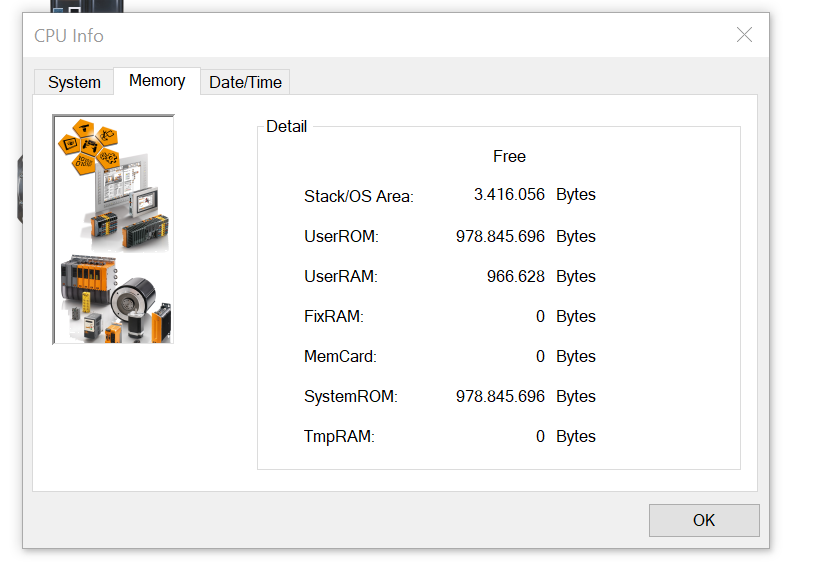
the error message is not caused by the CF size, but by to less available DRAM in your PLC.
Here’s a short description about the topic: when modules are transferred to the PLC, they first have to transferred and stored to DRAM, before they can be copied to CF. And if not enough DRAM is free, the module transfer fails - I assume, this is what happens on your system.
The PLC you’re using is a legacy one and quite old, it only has 32MB of DRAM and was developed many years before, when the versions of Automation Runtime, Servo Drive Operating System and so on where quite smaller then the lastest / last ones.
So most probably the DRAM is already almost completely used by the operating system, and therefore the download of the ACOPOS operating system (which is the module ACP10sys) to the PLC cannot be processed.
DRAM of the PLC cannot be expanded / upgraded, and you can’t directly influence the DRAM usage of the PLC.
To get more DRAM, you need a more actual PLC. But there’s maybe one thing you could try → saving some DRAM by disabling Webserver + SDM.
You could try :
In CPU → configuration, switch “Web Server” to “off” - “System Diagnostics” is then automatically disabled too, and SDM is not longer available! (sorry for that, but I don’t know any other possibility to save some MB of DRAM on that system)
Perform an offline installation: unplug the CF out of the PLC (PLC has to be powered off when (un-)plugging CF from PLC!), use a USB CF cardreader and perform an offline installation via “tools → offline installation” (then, the data is written directly from your notebooks Automation Studio via the USB CF reader to the CF card).
Plug CF again and power the PLC, wait some minutes to finish reboot.
Webserver & SDM is now permanently disabled and not longer accessible, but the system has about 4 MB more DRAM free.
You can check the free DRAM of the PLC by using AS menu “Online → Info → Memory”, the free DRAM is the “Stack / OS Area” entry (my screenshots were made with a similar system).
Another attempt is to put the PLC into service mode, transfer the program, and then put the PLC back into RUN mode. In service mode, the PLC should require less RAM.