We have a setup with multiple controllers (x90) and a single T50 panel. The controllers run all different tasks and have their own MappView Project. The controllers and T50 are connected to a modem and have a static IP. Now I’m trying to access one of the controllers’ mappView project via a webviewer widget. However this does not seem to work via the modem. The B&R logo shows up, but the connection is reset every few seconds.
Is this possible to get to work or is there a better way to achieve the desired goal?
I tried it on my laptop, on the modem I’ve forwarded port 8081 to 192.168.0.20:81. The ip on the webviewer is set to 192.168.0.21 and the port to 81.
When I navigate to 192.168.20.70 the MappView project of 192.168.0.20 loads and the webviewer inside this project displays the project of 192.168.0.21. However this only works when the ethernet cable between the modem and laptop is connected. I’ll check the date and time later today. In the project both the T50 and X90_2 had the NTP client set to 192.168.0.20 where the NTP server was enabled. I didn’t check this if it worked.
I am not sure if you can do it this way. You use forwarding on the modem to access the 1st vis. You access the 1st vis through 192.168.20.70:8081. The second vis is embedded into the web view via IP 192.168.0.21:81. Keep in mind that this is an iFrame that loads a second web page into your web browser, not into the existing vis. This means the IP that you enter in your web widget must be accessible on your laptop through that same address. What happens when you add a second forward rule on your modem that forwards to 192.168.0.21 and then use that address in the web widget?
Result is still the same: MappView keeps reloading on the T50, but works on my laptop.
When I add the rule to forward port 8083 to 192.168.0.20:81 in the modem and set the webviewer ip to 192.168.20.70 with port 8083 the behaviour changes:
My laptop shows the B&R logo, but then keeps refreshing. But the display is not able to connect to that IP and doesn’t show anything.
I am a little bit confused. You write that you forward port 8083 to 192.168.0.20:81. I believe it should be 192.168.0.21:81.
The other thing is the T50. I thought the issue only exists when you try to open the vis on your laptop. Did you also check
the time on the T50?
You’re right sorry for the typo, the port forward was set to 192.168.0.21. The time on all three devices is the same. I’ve now also tried it with a different switch, but the result is the same. Is there a possibility to check some logs to see whats the reason for the restarts?
So the current state is that you forward 192.168.20.70:8083 to 192.168.0.21:81 and 192.168.20.70:8081 to 192.168.0.20:81? When you enter 192.168.20.70:8081 or 192.168.20.70:8083 directly on your laptop browser, they both load fine? But when you use 192.168.20.70:8083 in the web widget on 192.168.0.20, it does not load on your laptop?
What about the T50? When you use 192.168.0.21:81 for the web widget it works fine, but with 192.168.20.70:8083 it does not? That is what I would expect as behavior because I don’t think the port forward would work on the other side. For the final solution would be a session variable that changes the web widget URL depending on the source. The first goal would be to find URLs that work with the T50 or your laptop.
On the T50 both 192.168.0.20 and 192.168.0.21 work fine if I set them in the settings of the display.
Routing it via the router does not seem to work (forwarding port 8082 to 192.168.0.21:81 and setting 192.168.20.70:8082 as the target of the webviewer). The B&R logo doesn’t even show up.
On my laptop I can access both webvisu’s fine via the router 192.168.20.70:8081 and 192.168.20.70:8082.
@vanessaca there are no IpForwarding parameter options on the X90 Ethernet interface
The reloading is a typical behavior when the clocks are different, but we already checked that. I dont think this is an issue of the iframe since it works fine on the T50. I would go back to the original IP of the modem with 192.168.20.70. There are two more things that you could try.
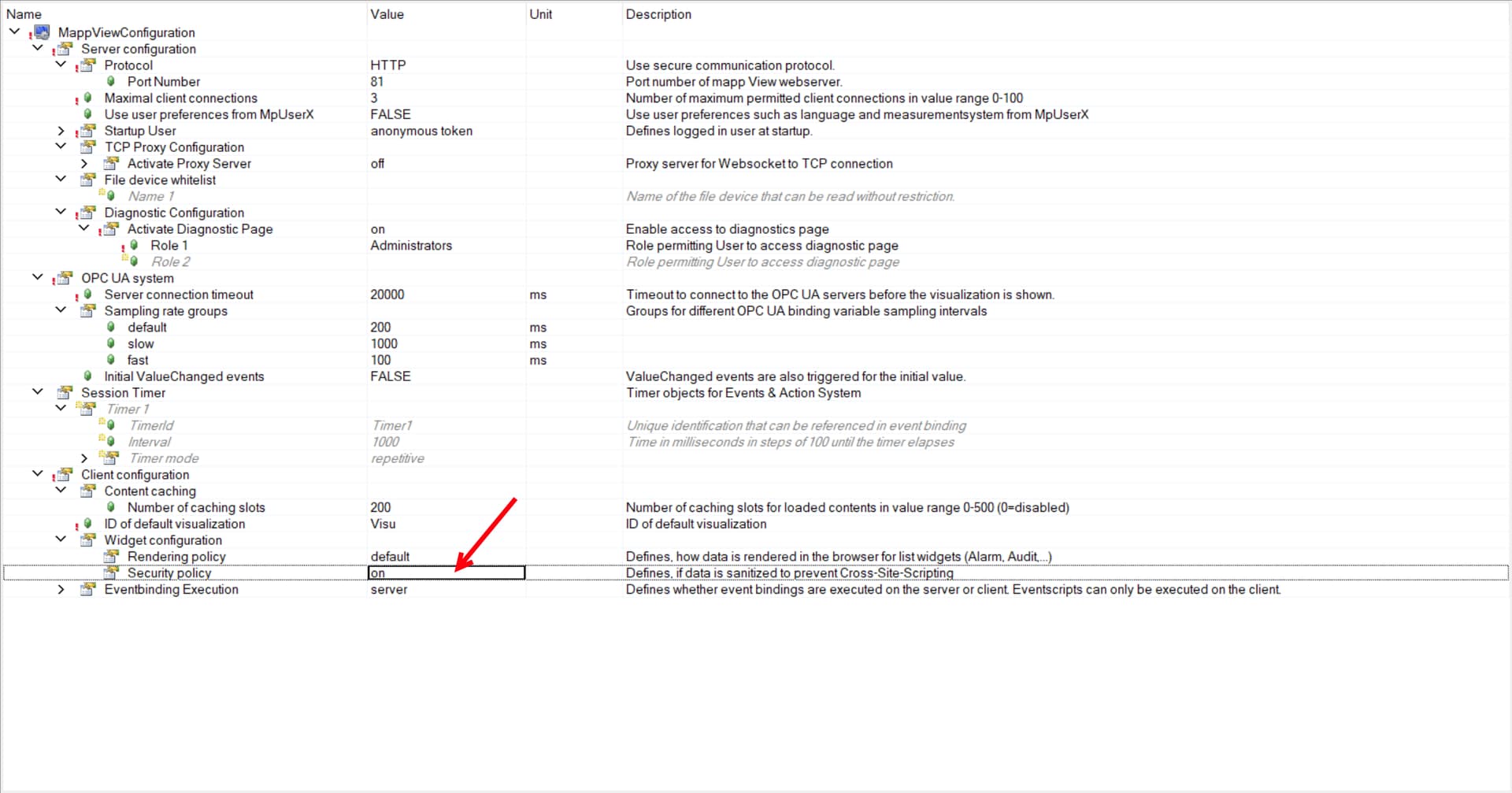
Set security policy to false. Do a full rebuild and download the project.
I’ve also tried setting the modem as NTP server on both T50 and X90s, checking the ‘Wait for NTP sync’ option on the T50. The result is still the same; if I set the IP of the Web server on the T50 to 192.168.0.21 the mappView loads fine, but the WebViewer inside 192.168.0.20 keeps reloading.
I am little bit running out of ideas. Can you hit CTRL-SHIFT-I on your laptop to open the developer interface. Maybe there is a hint in the browser when it reloads. mappView loads a cookie from the server and it seems like this cookie expires immediately.
So I did some testing myself and I believe the issue is that the embedded visu uses HTTP instead of HTTPS. Can you please add a certificate to the visu that you embed following the attached guide. You only have to create the certificate, change mappView to HTTPS on the embedded vis. Then use https://192.168.0.21 for your web widget.