Hi we have br cards digital input / outputs and the R on each of them are blinking green. The hmi on the panel we have these faults. Can someone help me pls

Hi @Skjanu ,
Welcome to the Community!
Could you upload the SystemDump and send to us?
Thanks
Ciao
Valerio
Hi Valerio i dont know how to extract the system dump 
Hi @Skjanu ,
I don’t know your visualization so you need:
- laptop
- Ethernet cable
- IP Address of your machine
If you have all of them follow these steps:
a) Connect your laptop to ethernet port of your B&R CPU X20CP1584


b) open your browser (Chrome/explore/Edge) and type the URL:
http://<ip_address>/sdm example http://10.0.0.2/sdm if 10.0.0.2 is the IP Address of your machine
c) if no problem on a) and b) you should see this page and click on SystemDump:

Try, if you reach this step we are almost done, ping me when you see SDM page
Ciao
Valerio
Thanks Valerio that you are helping me from were i get the ip address from the hmi i think right? And with the system dump what i will know pls. Sorry i am asking questions but i am new on these things
Hello Joseph,
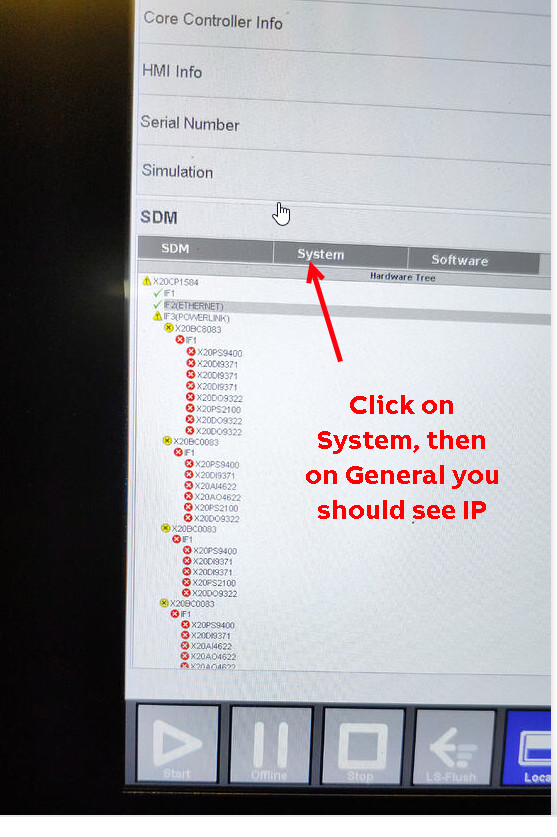
If you can see the System Diagnostics Manager, then the IP address will be listed within the System page, General tab. It looks like the picture you uploaded is of the HTML pages (loaded in the HMI), so you may have to scroll down depending on the viewer size. Look for a section labeled Ethernet Network Devices as shown below (3).

(1 System page, 2 General tab, 3 Ethernet Network Devices section, look for IF2 as that’s the Ethernet port on the X20CP1584)
-Austin

Thanks Austin for helping me
I don’t know Austin how we can export data from his HMI, that’s why I’m trying to connect with his laptop to the machine
Valerio if2 or if4 i have to see for my ip address ?
Hi Joseph
Ethernet is IF2
And from where i get the ip address of the machine pls. And after i enter as you told me on the page what i have to do

Now here in malta is night valerio i am not at work hehe. Tomorrow i will be again at work i dont know if you will be here thats why i am asking
Don’t worried Joseph, this is the advantage of Community, we start the investigation in US and colleagues from Europe will continue that…hehe
I have an X20 cpu with me and I’ll prepare few screenshots to clarify which steps you have to do for getting the system Dump.
you are lucky this US night I’ll watch Sinner:

Once we understand which is the problem from SystemDump I guess we have to involve the B&R Support in IT, because your machine
was running fine and now we have problem, possible hw problem.
Ciao
Valerio
I like this community because is very helpful not they try to joke on you because i am new on these things and respond very quick 
This problem happened after we had a powercut . So you are busy tonight watching tv and send me the pictures
My engineer is downloading the automation studio 6 software to try to connect with the machine. With the software you can see the faults also valerio ?
Obtaining the SDM system dump file by connecting with your laptop and downloading it will provide us with enough information to determine what the PLC is seeing and provide some next steps.
Some observations from the picture you provided that may help you find and resolve the issues:
-
Check on the System Page > General Tab, that the Current CPU mode is RUN. If this is SERV or otherwise, then there is a critical fault on the PLC. The hardware is expected to be not communicating because the PLC is in fault. The SDM System Dump will provide information about the status of the PLC.
-
Check that the POWERLINK cable is correctly plugged into the IF3 port (looks like an Ethernet port, labelled 13 below) and that cable is connected to the X20BC0083 modules.
Operating and connection elements -
Ensure that the POWERLINK cables are in good repair (not frayed/spliced/damaged/etc).
-
Check that the node numbers on the front of X20BC0083 modules match the machine documentation, and that there are no duplicate node numbers.


You can also review the SDM Hardware icons to give you some idea of what the PLC is seeing and reporting via the SDM. Link: Using the Hardware page
-Austin
you don’t need Automation Studio for uploading the SystemDump, you just need a browser installed on your laptop.
Please don’t try to connect to the machine with Automation Studio, because you have access to all functionality and potentially you can
erase the memory of the machine!
We want just to upload a file, that’s all!
Ciao
Valerio

Green is good color, your CPU is not in service, as Austin said double check the powerlink cable (blue, on right side)

or (we don’t know the topology of your powerlink network) the switch is broken

We need your help @Skjanu or from someone from your team to understand the topology of your powerlink network.
Regarding SDM, I found few notes I wrote for another customer:
- Connect to SDM (B&R SystemDiagnostic Manager), type on your browser: ip-address/sdm/index.html
(the ip-address you see on your HMI on SDM > System > General Page)

- Click on SystemDump

- Select “Parameters + Data-Files” + press ok

- Pess ok on the following popup
- Click on “Upload from target”


6) Send me this file created on your Download page:

Ciao
Valerio