CPU 7CP476 not communicating with sw B&R PG2000

Hello colleagues

I’m trying to programming a CPU model 7CP476.60-1, which was returned from technical assistance after its power supply was repaired.

When I turn on the CPU with the CAN-ID Nr switches in the “0 1” position, the ERR, RDY, and RUN LEDs blink.

The RS232 LED blinks very faintly approximately every 5 seconds.

The problem is that I cannot communicate with it in any way to reprogram it.

From what little I’ve read in the B&R 2003 manual, there’s only one possibility where all three LEDs can function simultaneously, which is when the CPU enters “Service” mode.

I have the B&R PG2000 v2.41 software and the original source code from the machine where the CPU was installed. I use a laptop with a real RS-232 port with Windows XP installed, and to open the software I use a virtual machine with Windows 95.

- The port originally recognized by the system is COM1. In the communication parameters (driver settings), I chose 57600, 8, E, 1.

- I know the problem is not the cable, as I can communicate with other CPUs of the same model that are operating in the machines.

- I then thought about updating the CPU’s operating system (programming system flash). So, I set the CAN-ID Nr. Switches to the “0 0” position.

  1. In settings > connections, I chose the option mo_p1n57.br, but the CPU does not establish communication with the laptop. Several times the message “Error 4920: Bootmanager - Connection Lost!” appeared.

  2. I tried the option target > service > update PCCSW. The laptop attempts to communicate with the CPU, resulting in the following window:

“Push the reset button on the…” (The window doesn’t enlarge, so I can’t see the complete message). Below this message, it shows the option to choose the Baud Rate (set to 57600) and the COM port (selected as COM1).

I click OK, and at the bottom, the message appears: “Connection is being established - please wait!”.

After a few moments, a window appears with the message “Error 4960: Bootmanager - No valid system file to select!”.

I also tried diagnosing the CPU (target > service > Diagnose) using the same communication parameters as before, but leaving the CAN-ID keys in the “F F” position, but I was unsuccessful.

I returned to the technical assistance where the CPU was repaired, and they said that the operating system has already been installed. They did this through a DOS program called BOOTCOMM v3.00 B&R. We tested it on their own laptop. I observed that the RS-232 LED blinks constantly, the program recognizes the communication between the laptop and the CPU, identifying the model (CP476), and starts downloading the operating system after erasing the Flash memory.

The program scans the entire memory and completes the recording 100% without errors.

Afterwards, I asked them to program the original source code of the machine using the same program, changing the CAN-ID switches to the “0 1” position, but they couldn’t because the COM port communication is not recognized under these conditions.

Is there a missing step when trying to establish communication? Is there anything else I can try using the B&R PG2000 software?

Any help is welcome.

Thanks.
Hi,

I’ve never used PG2000, but the message "Error 4960: Bootmanager - No valid system file to select!” sounds a bit like that the PLC operating system is not available inside the local PG2000 installation.
It’s more then 20 years ago, but if I remember right, the PG2000 software and the PLC operating systems were 2 different setups.

Is your PG2000 installation a “fresh” one, or was it somewhen in past already used to transfer an operating system to the PLC?

Hello Alexander.

The steps for flashing the binary code and the PLC operating system are indeed distinct processes.

I’m used to flashing the source code onto the PLC. However, flashing the operating system is the first time I’ve attempted it.

Do you know what the file extension of a B&R 2003 operating system file would be?

I contacted a local B&R representative here in Brazil seeking assistance, and unfortunately, he informed me that because it’s obsolete hardware/software, they are no longer providing support, even from their Austrian headquarters.

Kind regards,

Brunoo.

Hi Bruno,

the following infos are deep out of the back of my mind, so I really can’t swear.
But as I remember, the operating system file names were PLC type and version dependend.
Per PLC type, there were 2 files:

  • one starting with an “@” followed by the PLC type name with file ending “.br”
  • the other file name also included the PLC type name + some numbers, with a file ending of “.s1*”, where “*” was a number depending on the operating system version
  • all of these files were copied by the installer into the PG2000/SYSTEM directory

Hopefully, there are some other Community members out there having some more experiences with PG2000 who can confirm or correct my memories.

Best regards!

Hi Alexander,

Thanks for your support. I’ll look through the program folders to see if I can find any files with the descriptions you provided.

Kind regards.

Hi Alexander.

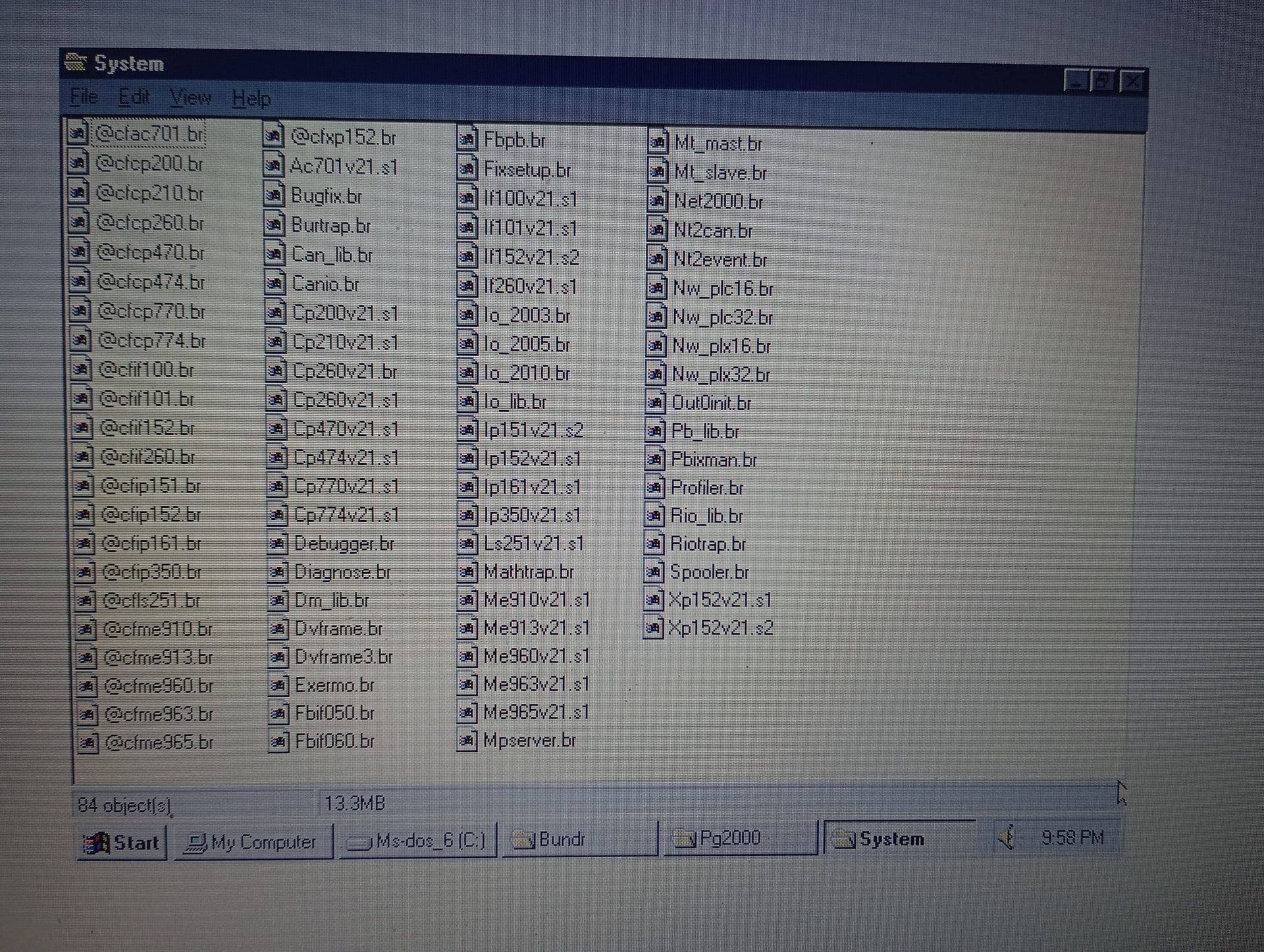
Look how curious… I accessed the System folder and, as you said, there are files that start with @ and end with *br, and also files that end in *s1. As shown in the image, the System folder contains the .br files for all the CPUs, EXCEPT for the CP476, which is precisely the CPU model I need.

Not wanting to accuse anyone, but is it possible that the machine manufacturer may have intentionally deleted this file so that it would be necessary to request a paid service to have the program installed?

Or does this file installed during the PG2000 software is installed on the computer? Could it be a software installation error?

I’m really confused now.

Kind regards.

Hi,

I don’t think/hope that the files where intentionally removed - sure, nothing is impossible, but providing the project source but deleting the operating system files doesn’t seem to be a “clever way” to protect after-sales business :wink:

About the installation I can remember that it have been two different setups:

  • the disk-set with the PG2000 setup
  • another disk-set with the Operating Systems

So it was possible to add/install newer/different operating system version support into existing PG2000 installations.

What I can conclude out of the screenshot (thanks for that!) is, that the operating system version for all of the installed PLCs is V2.10.
For CP476, V2.10 has never been existing, as this PLC type was developed later then V2.10 was released… so I don’t think it’s an installation failure or so, it just looks like that the installation packages where this installation is based on are older then the time when CP476 support was added to PG2000.
The CP476 was introduced almost near at the end of the PG2000 life-cycle, so I think the operating systems usable with CP476 were some versions >= V2.2x (I don’t remember the concrete numbers).

Do you have any information about what operating system version was used with the CP476 (e.g. from the manufacturer, inside the documentation of the project or some other manual, or from other machines using a CP476), and in addtion, if PG200 V2.41 is really the version used for the CP476 project (the last version of PG2000 was V2.44)?

Sorry for asking so much questions instead of giving concrete advises, but as there has so much time gone by since these systems where active, it’s rather hard to get clear picture of what could be done.

Best regards!

Hi Alexander.

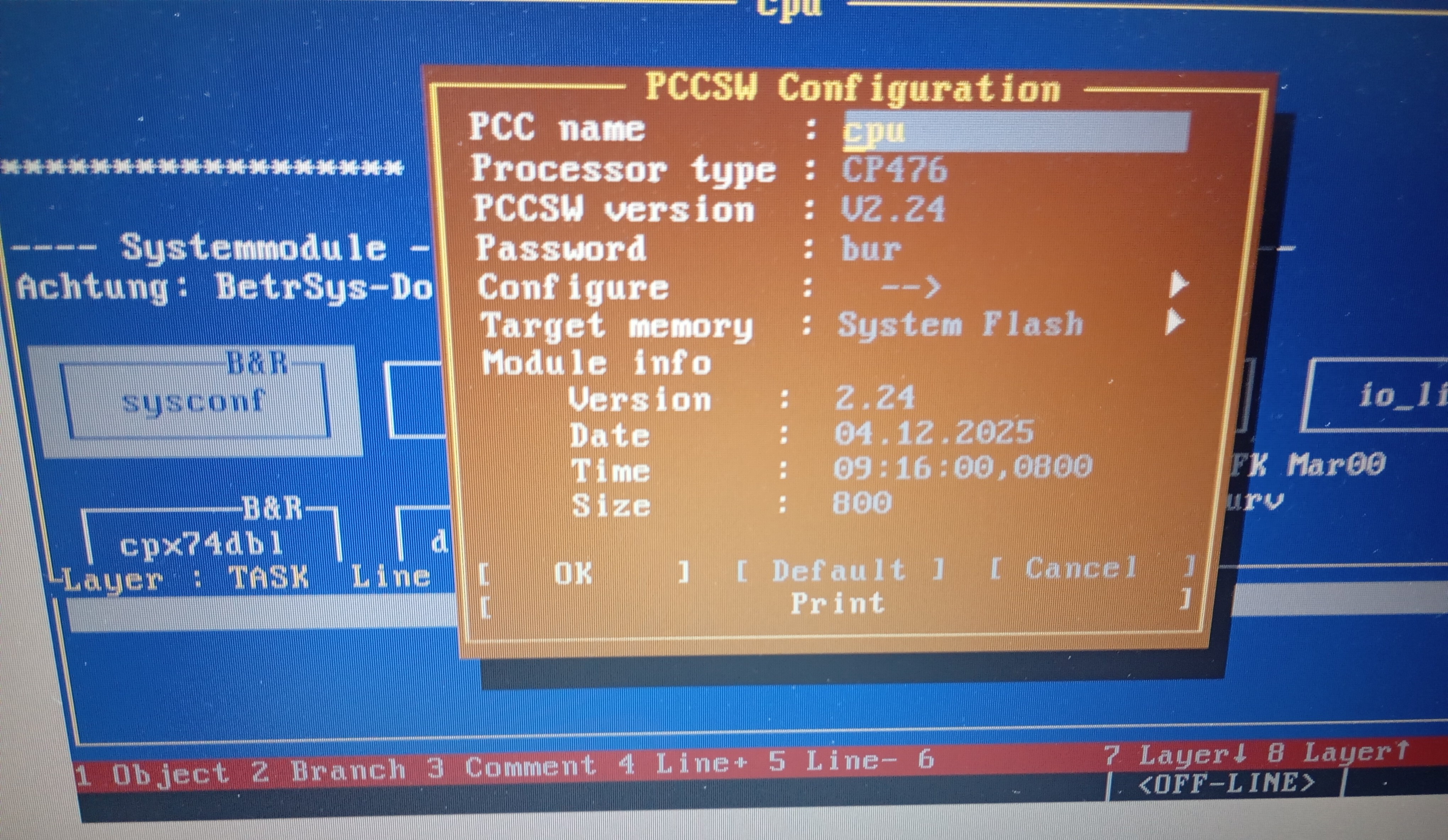
As per the attached image, the sysconf library indicates that the PCCSW version is 2.24. All I have is the program installer.

I didn’t know there was a separate operating system disk. Could some of the more experienced colleagues clarify this for us? In that case, uninstalling and reinstalling the program won’t solve the problem, since the operating system is installed separately. Is there anything I could do in this situation?

Kind regards.

Attached you will find V2.24 for all SG3 PLCs - I checked the contents of this ZIP file and also the CP476 is part of this package

V2.24.zip (5,6 MB)

Anyhow I also need to tell that I cannot help with PG2000 - it is simply too old and I have no knowledge of this program.

Please bear in mind that this program is over 25 years old

best regards

Oliver

3 Likes