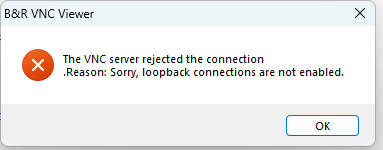
I’m facing an issue with B&R VNC Viewer. When I try to connect, I get the error message: “Please enable loopback adapter.”
I’ve already installed the loopback adapter as suggested, but the error still persists. I’ve tried restarting the system and rechecking the adapter settings, but no luck so far.
Has anyone encountered this before or knows what might be causing it? Any help or suggestions would be greatly appreciated!
Automation Studio Version V4.3.7.46 SP.
Automation Runtime G4.34.
Visual Components V 4.34.6
Connection for Both Arsim and real Hardware. (As i will be using simulation for some changes and then dump in hardware)
In logger VNC Protocol Error, I have attached the image for your reference.
Ok. In the logger is error VNC Error 28741 with details that VNC server has not started. So this is the reason you have to focus on. Do you have enough memory?
try to create empty visu and connect it to VNC server
The last possible action before you contact local office support is to try a different version of VC. If this does not help either, then please get in contact with the support of your local B&R office and provide a link to this community post as well as the project.
Hi @SANDEEP_KAMBLE , I have been troubleshooting a similar issue with a customer. Were you able to resolve your instance of the “Warning 28741 - VNC protocol error - VNC server not started” error with the help of your local Support team? If so, what did you do to fix it?
just out of interest, when does it happen on your customers side? Just when using ArSim, or also when using real PLC?
Because the error above was thrown while a project installation was running.
It’s a long time ago and so I’m not sure if I remember right: but I think I personally have seen the “VNC server not started” only once in past, when using ArSim and the VNC server port was already blocked by a running VNC server in Windows; and if this Windows VNC server additionally has loopback disabled, it could lead to the situation discrebed.
But as Sandeep mentioned it happens also when using a real PLC, I was wondering how your setup looks like?
many thanks for your answer!
It’s really interesting that the ArSim throws a memory violation at the same stage, where the real PLC doesn’t starts the VNC server (or at least says so).
Because of the memory of ArSim and the real PLC behaves different (unequal amount of memory, therefore maybe unequal memory mapping when allocating and freeing dynamic memory portions), the different issue behavior could point into the direction that some VNC-Server dynamically allocated memory is corrupted while / after the project installation, e.g. by a misleaded or not yet new initialized pointer or memxxx()-/strxxxx()-based operation…
… sure, that’s just a guess I know, but I would really recommend to have at least a look into that direction also. Especially if the issue just happens in direct correlation with project transfer, where definitely “by-system-dynamic-allocated-memory” changes.
Thanks Josh for posting the additional details. And @kovarj just to confirm, we do have an active CASE to troubleshoot this issue, I was just curious whether @SANDEEP_KAMBLE had already resolved the issue on his side. I will follow up once we have found a resolution.