Hi all
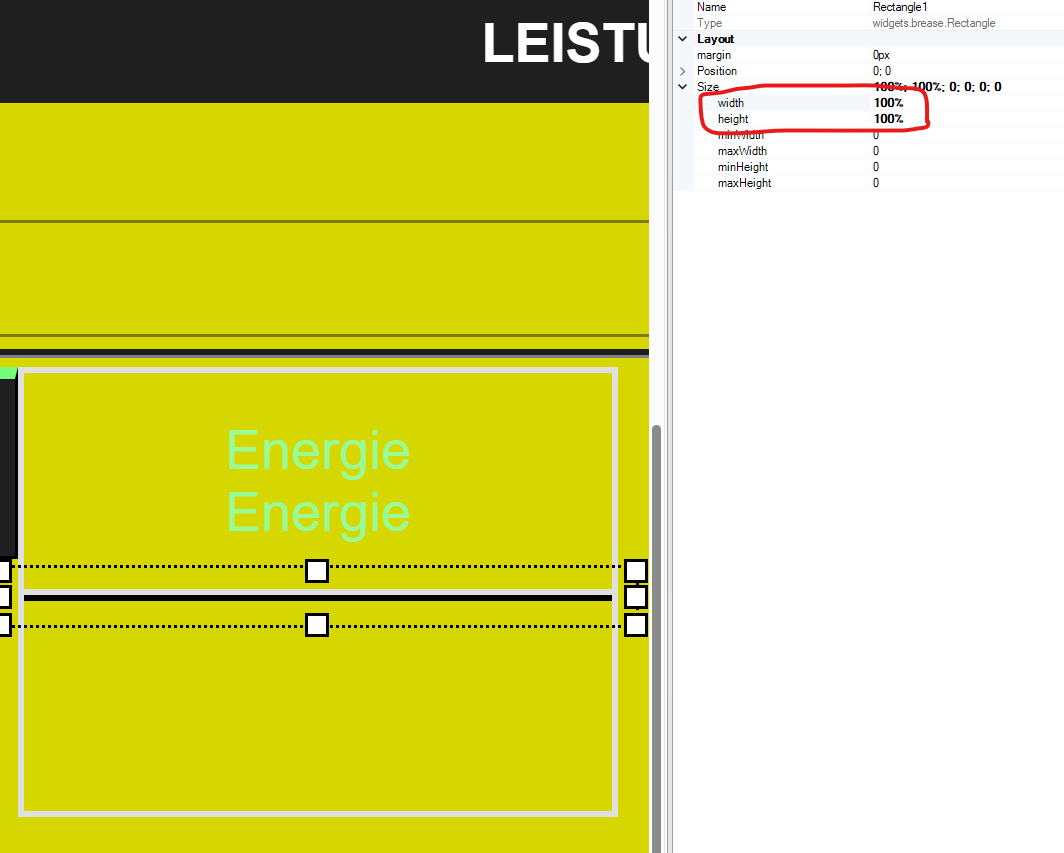
I have a flexbox with two flexboxitem. In the upper one I have a placed a label with the attributes “width” & “height” = 100%.
This worked as intended as you see on the picture, the label fills the whole flexboxitem.
Now in the flexboxitem below I have placed a rectangle with the same attributes for width and heigth.
But somehow the rectangle then does not fill the flexboxitem it keeps narrow like just 1px? The width on the other hand works.
What am I doing wrong here?
Hi Stefan,
You aren’t doing anything wrong it’s just how the two widgets Label / Rectangle behave within the FlexBoxItem.
However I also think that you may have changed another setting because I can only reproduce that behavior if the FlexBoxItem’s childPositioning = relative.
In that case the Label is also not filling 100% of the FlexBoxItems height and is only as tall as the text within requires it to be (fontSize + padding) but it does cover the entire width.
Now the rectangle doesn’t have any “content” inside only the border (if there is one) so it will shrink down to the thickness of the border width x2.
So the combination of percentual size and relative childPositioning is not a good one, I don’t think that’s a bug but purely the logical result of essentially two relative size conditions not being able to be used together. Btw if you do the same with a GroupBox the result is the same!
I hope this makes sense
Thanks Marcel
That was the problem.
I changed the FlexBoxItems childPosition to “absolute” and it worked.
1 Like