Automation Studio V6.1 is released in December 2024.
Together with Automation Runtime 6.1 this enables multi-core support.
Already a lot of current cpu’s are multi-core, but until now only one core was used for AR.
In AS V6.1 on a multi-core cpu a process (background task) can be assigned to the extra core(s).
This results in more performance for the core assigned to AR.
On a dual-core cpu, which contains a powerlink interface, the powerlink stack is always assigned to a core.
Examples : X20CP0482, X20CP0483, X20CP0484, 4PPC50.101E-10B.
On a dual-core cpu without a powerlink interface the extra core could be used for the OPC UA stack/communication.
Examples : X20CP0410, X20CP0411
This is also the case for quad-core cpu’s like X20CP3687X and 5APC2200.AL18-00.
In the AsArProf library extra function blocks are added to read out the number of cores and the load on these cores.
CpuGetNumberOfCores()
CpuIsCoreReserved()
CpuGetLoadByCore()
Example program
	CASE Step OF
		0:
			NumberofCores := CpuGetNumberOfCores();
			IF ((NumberofCores > 0) AND (NumberofCores <5)) THEN
				FOR i:=0 TO (NumberofCores-1) DO
					CoreReserved[i] := CpuIsCoreReserved(i);
					LoadByCore[i] := CpuGetLoadByCore(i);
				END_FOR
			END_IF
			Step := 1;
		1:
			;
	END_CASE
Another background task is for instance mapp Robotics.
This SMP support for mapp Robotics is featured in mappMotion 6.2. (Release in March 2025)
This is really amazing. There are a lot of innovations coming around us. Thanks @corne.geerts for finding the time to notice us and prepare this overview with example program. Let this be an inspiration for others in our BRCommunity.
Unfortunately X20CP0410, X20CP0411 do not support Multi-Core due to licensing restrictions.
Multi Core is only available on APC and X20CPx686X (2 Cores), X20CPx686X (4 Cores).
Thanks! It is just an statement. Recently I’m using automation studio 6 which have “multicore processing”, I was thinking that it can do it in “Task clsss or realtime class” but I think it is not ready yet.
Example:
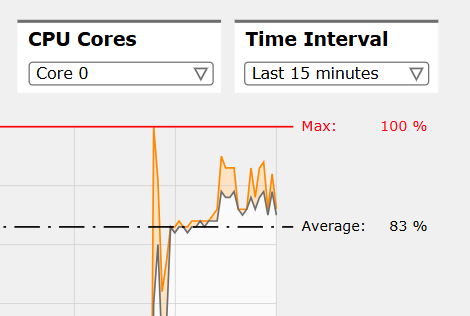
Core 0:
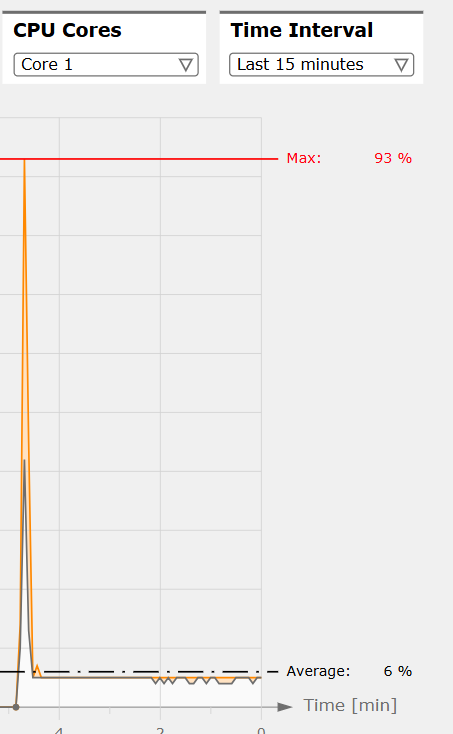
Above shows core 0 run 83% and core 1 run only 6%. If we can move more tasks to next core, it will be the best case. I think what I’m looking for is this:
I would like to share with you one test our customer tried to do yesterday:
He tried to assign different task class to different cores on APC910 (He installed latest HW upgrade 2.2.0.0 and latest AR 6.6.2):
that’s correct, APC910, PPC900 and xPC3100 will not support this multi-core feature.
Only PPC80, xPC2200, xPC3200 and APC4100 are supporting this multi-core feature
Answer: yes and no. from AR 6.1 up to AR 6.4 = yes
with AR 6.5 and 6.6 = no
planned is to enable it again with AR 6.7
This is due to problems in specific combinations.
so…having the correct mapp Motion version doesn’t mean that feature is at the end available for your hw…my recommendation if you don’t see any improvement by monitoring CPU usage, profiler…don’t waste your time, call our Support and ask confirmation about your HW and settings.
I experienced an interesting case regarding these multi-core settings and would like to share it here as a user experience.
I migrated a project from AS4.12 to AS6. During the migration, I also replaced ACP10 with mapp Motion and SafetyRelease with mapp Safety.
I expected some increase in resource usage, but after the migration the average CPU load in the AS6 project jumped to around 88%, while the same project in AS4.12 was running at approximately 50%. With such a high CPU load, using diagnostic tools like Logger and Cockpit became very difficult, and even navigating between HMI screens was noticeably slow and frustrating.
However, after changing the hypervisor assignment from Core 1 to Core 2 and redistributing the tasks between Core 0 and Core 1, the CPU load distribution became much more balanced. Currently, the average load is around 49% on Core 1 and 20% on Core 2. In addition, both the diagnostic tools and the HMI performance became significantly smoother and more responsive. Still monitoring the behaviour but so far so good.