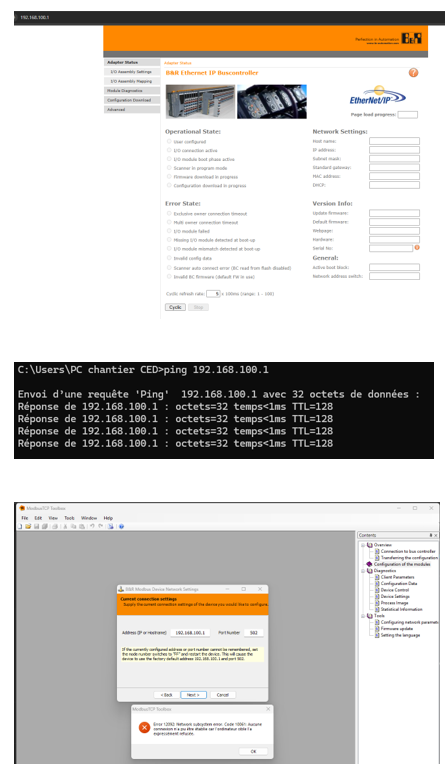
I’m trying to access the configuration of the X2BC0088 , the access to it through web server is empty ( Updating firmware on the X20BC0088 ) i then followed same appoach to access it throug modBusTCP with FF to access with default configuration . but still not possible to access it . Can somebody explain to me how to do it ? or where can i find the info?
when i try to access it through ip address directly , i access the web page but everything is blank . so i found the web page to upgade the firmware saying the same thing , an to be able to access the configuration you need to use ModbusTCP. I tryied also with automation studio to acces the data but still did not fiind the way.
my need :
change ip adress/ port
acces the modules parameter spacially the X20DO4529 (i have one relay that goes down for no reason every 2months ) I looked inside the documentation that they might be a parameter to change to be able to save the last state and keep the relay close (last state)
How can i do to be able to access the data / configuration?
I did : 0#FE to reset and then 0#FF to have configuration in default .
First you should update the firmware. This can be done via the webserver or a so called "service tool” which you will get at your responsible B&R office
This tool upgrades the firmware without any webserver or similar.
After this the webserver should be accessable and it then shows the attached IO modules, etc…
Just to re-iterate what Oliver is writing, although I am a bit later getting to this topic.
You won’t connect to the X20BC0088 and view/edit configuration with the ModbusTCP toolbox. The goal of using the ModbusTCP Toolbox on the BC0088 is to update the firmware without using the webpages (which is broken with very old firmware). Once you update the firmware, then you can use the webpages for configuration of the BC0088 as described in the User’s Manual. The instructions to update the firmware are in my post (linked in your original post).